
Support
Similar as our technology does, our aim is to provide clear answers for any type of question and problem.



Instructions and answers
- Please read this User Manual carefully before using the Pro One
- DO NOT connect the Pro One to a direct power supply. Only connect the Pro One via a USB 3.x cable to a USB-C port (max 5 V / 500 mA) on the computer, smartphone, or tablet you intend to use with the Pro One.
- The Pro One may only be used for its intended purpose: to perform a non-invasive brain scan, in combination with the Psyray app. (Or as audio headphones, with the separately available audio converter and cable.)
- As defined in section 6, the user is responsible for ensuring all operational requirements are met. Psyray is not liable for invalid or misleading reports resulting from incorrect use.
- The Pro One does not contain an internal battery. Always use the supplied cables and avoid wireless setups to prevent signal interference.
When used in combination with the (mandatory) Psyray app, the Pro One device facilitates a sophisticated, non-invasive brain scan, collecting the subject’s data for analysis. Failure to comply with the instructions defined in this User Manual will result in invalid or incomplete data, and the corresponding report may be inaccurate.
The Pro One is suitable for both professional and personal use and operates within a secure and structured environment involving:
- An active account and subscription with an external partner application.
- The Psyray App, for the execution of the scan process.
- Psyray Cloud Services, where data is processed.
Scan Workflow | User journey:
- Choose a scan/report within the partner application.
- The partner app triggers the Psyray App to begin a scan process (data collection).
- Data is sent securely to Psyray Cloud Services (“The Engine”) for processing.
- The final report is returned to the partner application, where it can be used.
Note: The Pro One is powered by your computer or smartphone/tablet via a USB-C cable.
- The device does not contain an internal battery.
- Always use the supplied cable and avoid wireless setups to prevent signal interference.
- After use, store the Pro One properly in its original packaging, with the connection cable detached from the pod and headphone.
Components:
- Pod
- Headphone with integrated scan sensors
- Special headphone connection cable
- USB-C (3.2-compliant) cable
Connection Steps:
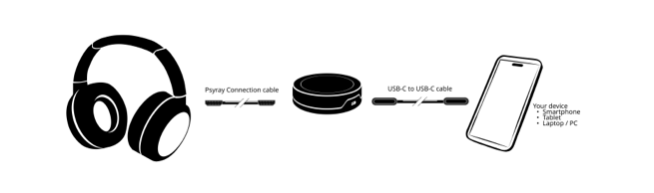
- Connect the pod to the headphone using the supplied headphone-connection cable.
- Use the USB-C cable to connect the pod to the computer, smartphone, or tablet running the Psyray App.
- DO NOT connect the pod to:
- a direct external power source
- a USB-hub placed between the pod and your computer,
- USB-C ports that produce more than 5 V or less than 4.5 V, or
- USB-C to USB-A conversion cables.
Important Notes:
- Ensure that your computer, smartphone, or tablet has sufficient battery power.
- Use only the original Psyray cables.
- Avoid USB-C cables that are longer than 2 meters, non-compliant with USB 3.0 (or higher), or non-certified.
- Ensure all scan requirements are met for reliable operation. (See section 6)
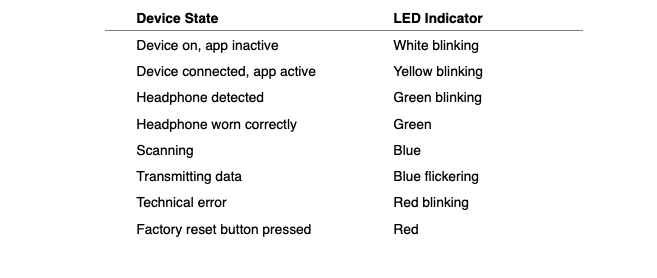
LED Indicator Status:
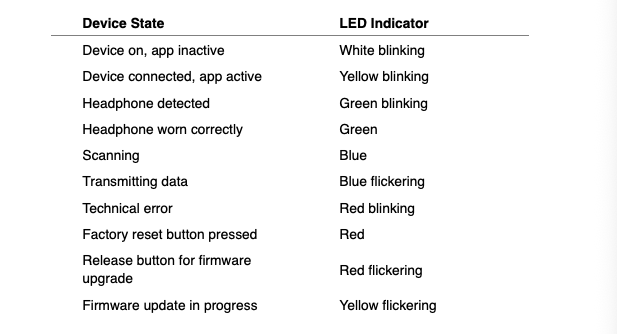
To reset the device: See section 12 - Maintenance.
The device is ready to use once you have:
- A valid subscription (via a partner application).
- Installed the Psyray app on your device.
- A stable internet connection.
Follow the steps outlined in section Device Setup. If any step fails or errors occur, the process will abort.
Important: put the headphones on the head with the cable on the left side.
The Psyray App must be installed on your device. Supported platforms:
- Windows 11
- MacOS 13 and above
- iOS 16 and above
- iPadOS 16 and above
- Android 13 and above
Scan duration: Averages approx. 5 minutes, subject to the selected report.
What do you see on the screen?
During the scan process, you will see the following on the controlling device’s screen:
- A LED light, in sync with the LED light on the pod.
- A picture of the organ or cross-section being scanned, with the dots reflecting the various markers that are being scanned.
- A progress circle, with the dots reflecting the relative time still needed to complete the scan. A new 5-second progress circle will appear as each bodily organ is scanned.
- Navigation button(s) at the bottom.
To ensure reliable scan data:
- The client’s name, birthdate, and biological sex must be provided. The system uses binary reference data based on birth sex.
- Remain in the scan room for at least 15 minutes before you begin scanning.
- Ensure normal body temperature; scans taken during a fever will not be accurate.
- Drug or alcohol use will also interfere with scan accuracy.
- Scans should not be performed on anyone under 12 years of age.
- Avoid proximity to strong electromagnetic sources (e.g., microwave ovens).
- Ensure the headset is placed correctly on the head, with the cable running down the the left side of the person being scanned and both earcups covering the client’s ears.
- Ensure the person being scanned sits still and follows the on-screen instructions during scanning.
- Remove any hats or head coverings while the scan is being completed.
- Block interruptions (e.g., calls on the smartphone operating the scan).
- When operating the scan via a smartphone or tablet, ensure the device’s battery is above 20%.
The user is responsible for ensuring all these scan requirements are met. Any use that does not meet these parameters may result in unreliable, incomplete, or misleading reports, and Psyray is not liable in such cases.
The Pro One contains embedded firmware that integrates with the Psyray App.
- Firmware updates are automatically managed and will be forced before further use of the scan device is allowed.
- Firmware upgrades are required after performing a manual reset.
The Pro One needs to be operated in normal office / housing conditions (10–35 °C / 50–95 °F) with max. 80% humidity, subject to the requirements defined in section 6.
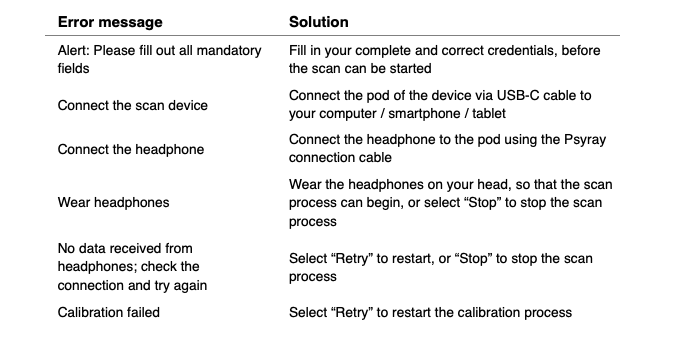
The Pro One performs an automatic calibration each time the complete scan device is physically connected to a computer or smartphone. If the calibration fails, an error message will appear in the Psyray app.
If, after several attempts, the error persists, or persists across sessions occurring on different days, please then contact the Psyray Support department via email at hardware.support@psyray.com for further instructions and/or a replacement.
Potential errors are communicated via your Psyray App’s messages, including clear instructions on resolving the issue in question. See the table below for the complete overview of all error messages:
See also the following table of LED status states and their meanings for additional troubleshooting help:
The Pro One is designed to automatically monitor its own technical functionality and does not require manual maintenance. The Pro One is therefore maintenance-free in terms of periodic servicing.
Physical parts, namely the earcups of the headphones and the connection cable, may be subject to wear and tear through use. These parts are not covered by the standard warranty and can be replaced separately by the user. Replacement parts are available via the official Psyray website.
Resetting the Pro One
If the Pro One is not functioning normally, you can reset it by following these steps:
- Unplug the USB-C cable from the pod, while keeping the headphone connected to the pod.
- Insert a paperclip (or similar object) into the reset hole on the bottom of the pod, press the reset button, and keep it pressed.
- Reconnect the USB-C cable to the pod to power on the scan device, while continuing to hold the reset button until the red LED starts flickering.
- During the firmware upgrade, the LED will flicker yellow. The pod will automatically return to factory settings. The reset is complete once the LED light stops flickering.
- After the reset, a firmware update is required. This update will be carried out via the Psyray app.
Each Psyray scan device comes with a warranty of one (1) year, subject to normal usage and following all requirements and recommendations laid out in this user manual.
- The Pro One is registered as a wellbeing device.
- The Pro One has successfully passed tests for electrical safety and EMC.
Spare parts and accessories can be ordered via the Psyray website or via Psyray’s Support department.
If you have a question or issue not addressed in this guide, our support team is happy to help. Please reach out to them via email at hardware.support@psyray.com.
If we still cannot solve your problem, eligible devices may be returned to:
Psyray Products BV
3e Binnenvestgracht 23G
2312 NR Leiden
The Netherlands
This scan device is covered by the WEEE Directive and must not be disposed of with household waste. Psyray complies with all applicable obligations regarding electronic-waste disposal through a certified external WEEE service provider.
Warranty on the Pro One is 1 year, except in the EU where 2 years apply. Warranty is subject to a number of criteria, as defined here.
The Psyray disclaimer can be found here.
- Psyray's partners are responsible for storing all client data, which must comply with any regulations applicable for that partner.
- Sensitive information that is only stored via the Psyray Engine is available to the client for a maximum of 3 years, provided that the client has an account with a Psyray partner.
- Psyray may retain data longer than 3 years for analysis to enhance its services.
- Psyray's partners store all client data in their own secure environments.
- Psyray stores all data collected by the Engine with Amazon Web Services (AWS), with the explicit restriction that this sensitive information can never be traced back to any individual by Psyray. Formally, this means that Psyray falls outside the scope of GDPR regulations, but Psyray nevertheless strives to comply with the strict ISO 27001 standard for information security.
- Upon request, the applicable Data Processing Agreements will be made available to Psyray's partners.
- Psyray's partners operate the commercial and/or operational environments in which scans are performed, providing subscription or other purchase options and the final scan reports. Psyray assists the partner in these endeavors.
- Psyray facilitates the technology (scanning device) and associated intelligence (the Engine) used to generate the information (reports) requested by the partner and its clients. Psyray then returns this information to the partner via their own application.
- The responsibility for what is done with this information lies with the user, whose subscription to these services is with the partner, not Psyray. In professional environments, internal processes will be in place to ensure appropriate access to privacy-sensitive data.
- Psyray stores all information collected for a reasonable professional period. However, Psyray does not collect or create medical files for users.
- Psyray never approaches clients (end users) themselves.
- You, of course, share some personal details with the partner operating the scan when you create an account with them. This partner must comply with international regulations regarding privacy and access (GDPR) and data security (such as ISO 27001).
- Psyray must also follow the criteria on data security laid out by ISO 27001. So all data is highly secured and can only be accessed by authorized Psyray staff after all applicable procedures have been followed.
- Even in such cases, please don't forget that we CANNOT link data to you as an individual, as we don't have your name or another mechanism to do so; only the Psyray partner operating the scan has your personal information.
- Psyray processes client data in its cloud-based Engine on behalf of the partner performing the scan.
- All data processing by the Psyray Engine is done on an anonymous basis.
- Although the user's name, date of birth, and gender of birth are mandatory fields in the Psyray app in order to obtain a valid scan, the user's name is not sent to the cloud-based Engine. The name will only be saved to the local computer / smartphone / tablet used to perform the scan.
- This means that no one within Psyray can trace any data back to any individual.
If you need support for your account, scanning device, or the output (reports), please reach out to the partner who arranged the scan. This partner can then reach out to Psyray for additional support if they are not able to help you directly.
The scan itself is not foolproof – so, yes, the system can be manipulated (consciously or unconsciously). If not all conditions are met or if manipulation occurs, the final output (report) might not be correct.
- A number of mechanisms are built in to prevent unreliable data from being collected, but these are of course subject to normal use meeting the specified requirements.
- In the event of serious technical disruptions to the environment and/or brain signals, the scan will be interrupted automatically.
The conditions required to collect reliable scan data are defined in the user manual and can be found here.
Yes, but if you open the Psyray App directly, and not through a partner application, you will only be able to change your preferred language. All other functionality can only be controlled via the partner application.
No, the Psyray app is the only application that can be used to perform a scan. The Pro One scan device does not work with any other app.
The Psyray app can be downloaded from the Windows, Apple, or GooglePlay stores.
The scanning mechanism is highly specialized and also depends on the technical status of the scan device. This complex and sensitive process can only be carried out in a separate scanning app facilitated by Psyray.
See the detailed explanation in the user manual that you can find here.
Please follow the instructions in the user manual that you can find here.
The scan device contains firmware. If a new version is required, the Psyray app will automatically notify the user and a new version will be downloaded and installed.
The user manual can be found here.
- The entire scanning device consists of a pod, special headphones with built-in sensors, and a special Psyray cable to connect these two elements.
- The scanning process only works with these three elements; no other cable can be used.
Each partner makes a financial arrangement with Psyray according to their situation and needs. This arrangement allows the partner to use Psyray's scanning and processing services as well as offer those services to their own clients.
- It is up to the partner to decide whether they will offer those services to their clients through one-time fees, a subscription, or any other model.
- Partners have sole responsibility for collecting and processing any such payments from their clients, and also for monitoring actual usage.
Potential partners must be professionals within the field of mental health and wellbeing, with services offered in a specific region. Potential partners' clients may be professional users, or they may offer direct consumer applications.
Although scanning and requesting reports always works in the same way, partners can choose how the resulting reports are presented to clients in their own applications.
No, for legal reasons Psyray cannot provide direct coaching services to clients. Please contact one of Psyray's B2C partners, such as Kalmoa, other partners listed on the Psyray website (https://psyray.com/markets), or a mental-health professional local to you.
The final scan report can be presented in various formats – for example, in paragraph form or an index. A wide variety of report types are available, which also distinguish between reports for mental-health professionals and reports for clients. The data for reports is, by default, provided in MD (Markdown) coding language to the partner app, but custom requests can be made for other formats.
Yes, visit www.kalmoa.com to see an example of a B2C application that uses the Psyray platform and scan technology.
- The partner providing the Psyray scanning service must have a distribution agreement with Psyray.
- Scan participants need an account on the partner app that will be used to run the scans.
- The participant will also need access to the Pro One, Psyray's scan device.
- Before running any scans, the provider will need to install the Psyray app on the computer, smartphone, or tablet they will be using for the scanning process. The Psyray app can be downloaded from the Windows, Apple, or Android app store.
- The Psyray user journey begins in the application of the provider's choice, usually a branded app linked to their own practice that is connected to the Psyray platform.
- This app – on a phone, computer, or tablet – can be used to initiate a scan, using the Pro One scan device. The Psyray app, working through any connected partner app, will guide the user through the scanning process.
- After the scanning process is completed, the data gathered is sent to the Psyray cloud ("the Engine") and processed there to create the report requested. That report will then be available in the partner application.
Psyray prioritizes data privacy and ethical safeguards:
- The client’s name is stored locally and encrypted within the Psyray App on your device.
- Date of birth and biological sex data are sent to Psyray Cloud Services; but the user’s name is never transmitted.
- Data is processed anonymously and returned to the partner application.
- In certain consumer cases, access to sensitive reports will be restricted until professional consultation is confirmed.
All systems (scan device, app, cloud) are built with modern digital security protocols.